Signup and onboarding
Complete signup flow, setup wizard, invitations, plans and GDPR compliance.
Signup flow
Registration prepares a personal workspace and an administrator account. After email verification, the user names the workspace and creates a first project.
The user submits the registration form (email, password, name, company).
The system creates an isolated workspace and an admin account with the pro_trial plan.
A JWT token is generated and the 30-day trial starts.
Automatic redirect to /onboarding to configure the workspace.
POST /api/v1/auth/register
Content-Type: application/json

{
  "email": "user@example.com",
  "password": "[votre_mot_de_passe]",
  "name": "Marie Dupont",
  "company_name": "Acme Inc"
}

// Response 201
{
  "ok": true,
  "user_id": "u_abc123",
  "workspace_id": "ws_xyz789",
  "plan": "pro_trial",
  "trial_ends": "2026-08-13T00:00:00Z",
  "redirect": "/onboarding"
}
Onboarding wizard
Two screens: name and situate the workspace, then leave. No project is manufactured — the first one goes through the assistant, which is the real path.
Workspace name
Name your workspace (company or team name).
Setup complete
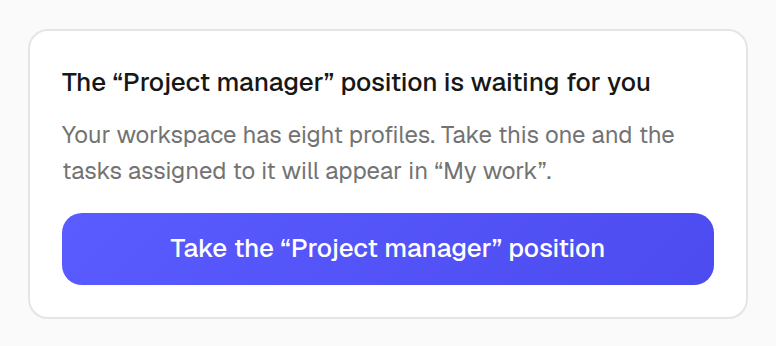
Your workspace is ready — and Zenoba offers to TAKE the position matching your role: one click, and “My work” shows your tasks.
POST /api/v1/auth/onboarding
Content-Type: application/json
Authorization: Bearer <token>

{
  "workspace_name": "Acme Inc",
  "workspace_size": "11-50",
  "sector": "ti",
  "country": "CA-QC",
  "role": "cp",
  "locale": "fr"
}

// Aucun projet n'est créé : le premier passe par l'assistant.
// Aucune invitation n'est posée : elles vivent dans l'annuaire.
Positions, from the very first minute
Onboarding doesn't build a stage set: every sector role becomes a position, every task of the first project is born attached to its chair, and a typed email performs a real substitution. On the way out, the final screen offers you your own position.
Invitation system
Invitations allow you to add members to your workspace. A unique token is generated for each invitation, valid for 7 days.
The admin sends an invitation via POST /auth/invite with the email and desired role.
The recipient receives an email with an invitation link containing a unique token.
The link redirects to /join?token=xxx. If the user already exists, they join the workspace directly.
If the user is new, they create an account (name + password) then join the workspace.
// Envoyer une invitation
POST /api/v1/auth/invite
{ "email": "new@acme.com", "role": "member" }

// Verifier un token d'invitation
GET /api/v1/auth/invite/:token
// -> { "valid": true, "email": "new@acme.com", "expires": "..." }

// Accepter l'invitation (nouvel utilisateur)
POST /api/v1/auth/join
{ "token": "inv_abc123", "name": "Jean", "password": "[votre_mot_de_passe]" }

// Accepter l'invitation (utilisateur existant)
POST /api/v1/auth/join
{ "token": "inv_abc123" }  // utilise la session active
Plans and limits
Zenoba offers 4 plans for all team sizes. Each plan defines limits on projects, users, storage and AI tokens.
Starter
For freelancers and small teams. Essential project management features.
Pro
For growing teams. Advanced Gantt, export, templates and AI.
Team
For SMBs. Advanced collaboration, forms, automations and reports.
Enterprise
For large organizations. API, dedicated support and on-premise deployment.
GET /api/v1/auth/plan
Authorization: Bearer <token>

// Response
{
  "plan": "pro",
  "trial_days_left": null,
  "limits": {
    "projects": 25,
    "users": 50,
    "storage_gb": 20,
    "ai_tokens": 200000
  }
}
Feature gating by plan
The UpgradeGate component blocks access to premium features based on the current plan. PlanLockBadge displays a lock badge on restricted buttons with a link to the upgrade page.
// Composant UpgradeGate
<UpgradeGate feature="gantt_export" plan="pro">
  <ExportButton />
</UpgradeGate>

// Si le plan actuel < "pro", affiche un PlanLockBadge
// avec un lien vers la page de mise a niveau.

// Composant PlanLockBadge
<PlanLockBadge plan="team" />
// Affiche "Team" avec une icone cadenas
Trial system
Every new registration starts with a free 30-day Pro trial. All Pro features are accessible during the trial.
On registration, the trial plan is prepared according to the active environment configuration.
A TrialBanner displays the number of remaining days in the top bar.
At D-3 and D-1, reminder emails are sent automatically.
On expiration, the workspace is automatically downgraded to the Starter plan.
Cancellation and downgrade
Cancelling a paid plan triggers an exit survey and a retention offer. If the user confirms, the workspace is downgraded to Starter at the end of the billing period. Data is retained.
POST /api/v1/auth/cancel-plan
Authorization: Bearer <token>

{
  "reason": "too_expensive",
  "feedback": "Great product but over budget",
  "accepted_retention_offer": false
}

// Response
{
  "ok": true,
  "downgrade_to": "starter",
  "effective_date": "2026-08-31T23:59:59Z",
  "data_retained": true
}
Data export
Full workspace export generates a ZIP file containing all projects, documents, users, forms and settings in JSON format. Compliant with GDPR / Quebec Law 25 portability requirements.
GET /api/v1/export/workspace
Authorization: Bearer <token>
Accept: application/json

// Response: fichier ZIP contenant
// - projects/*.json (taches, liens, jalons)
// - documents/*.json (metadonnees + fichiers)
// - users.json (profils, roles, domaines)
// - settings.json (configuration workspace)
// - forms/*.json (formulaires + soumissions)
// - audit_log.json (journal d'activite)
GDPR and privacy
Zenoba complies with the European GDPR and Quebec Law 25. Every user can export or delete their data at any time.
The user requests account deletion via POST /auth/delete-account.
An automatic export is generated if the export_before_delete option is enabled.
A 30-day grace period allows cancelling the deletion.
After 30 days, all personal data is permanently deleted.
POST /api/v1/auth/delete-account
Authorization: Bearer <token>

{
  "confirm": true,
  "export_before_delete": true
}

// Response
{
  "ok": true,
  "grace_period_days": 30,
  "deletion_date": "2026-08-29T00:00:00Z",
  "export_url": "/api/v1/export/workspace?token=tmp_xyz"
}
Beta access
The beta program offers early access to Zenoba with free AI credits. Credits are calculated by team size: 100K tokens (1-5 people), 200K (5-20), 300K (20+).
POST /api/v1/auth/beta-request
Content-Type: application/json

{
  "email": "user@example.com",
  "company": "Startup XYZ",
  "team_size": "5-20",
  "use_case": "construction"
}

// Response
{
  "ok": true,
  "credits": 200000,
  "plan": "pro_trial",
  "message": "Beta access granted"
}

// Credits par taille d'equipe :
// 1-5    -> 100 000 tokens IA
// 5-20   -> 200 000 tokens IA
// 20+    -> 300 000 tokens IA
Frequently asked questions
What happens at the end of the free trial?
Your workspace is automatically downgraded to the Starter plan. Your data is retained, but Pro features are disabled.
Can I invite members during the trial?
Yes, you can invite up to 50 members during the Pro trial. After downgrade, only the first 5 will remain active.
Is my data deleted if I cancel?
No. Cancellation downgrades to the Starter plan. Your data remains accessible. Only an explicit account deletion request erases data (after a 30-day grace period).
How does Law 25 / GDPR compliance work?
Zenoba provides full data export, deletion on request with grace period, explicit consent and data minimization.